Yes please!
1 Like
Hm… you could try some of these properties for justify-content and see how it looks or you can just use display: inline-block; instead or you can use some complicated span nesting with positioning and child/parent spans if you’re comfortable going advanced:
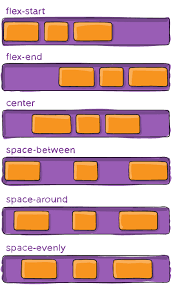
2 Likes
Negative margins exist, too.
1 Like
Thank you! I think I figured something out…
I was using space around (I forgot why, cause my other codes are center)… Then I just put some between them xD
1 Like
Nicely done!
Title
LOREM IPSUM DOLOR SIT AMET, CONSECTETUR ADIPISCING ELIT, SED DO EIUSMOD TEMPOR INCIDIDUNT UT LABORE ET DOLORE MAGNA ALIQUA. UT ENIM AD MINIM VENIAM, QUIS NOSTRUD EXERCITATION ULLAMCO LABORIS NISI UT ALIQUIP EX EA COMMODO CONSEQUAT. DUIS AUTE IRURE DOLOR IN REPREHENDERIT IN VOLUPTATE VELIT ESSE CILLUM DOLORE EU FUGIAT NULLA PARIATUR. EXCEPTEUR SINT OCCAECAT CUPIDATAT NON PROIDENT, SUNT IN CULPA QUI OFFICIA DESERUNT MOLLIT ANIM ID EST LABORUM.
I have another question xD
I’m trying to do different shape & I think I broke the code. I copy & pasted it, basically, from the shapes link on post #2 (it’s the diamond)
& this is how it shows up. I’m not sure what I am doing wrong…
1 Like
Try adjusting the value for left.
1 Like
I think it was the ‘position’ that was messing it up…
1 Like
Yeah? Position is very finicky.
1 Like
Anyone know how to create a dropdown menu? Used this, but I have no idea what I’m supposed to do.  Anyone??? @lightsUp
1 Like
H.T.M.L (Hypertext Markup Language)
It still won’t blur…
Does anyone know how to blur shadows?
What won’t blur?
1 Like
The shadow 
Are you trying to use text-shadow?
1 Like
You can do that? O.o
Nope, box-shadow. I followed the syntax on w3schools but then again, I am horrible at self-learning.
Yeah, you can do that.
Hm. Show me the code you tried?
1 Like
<span style="font-size:; display: block; border: 1px solid; padding: 10px; box-shadow: 5px 5px;"> </span>
1 Like
Oka ~
<span style="font-size: 30px; font-family: courier new; background-image: url(https://cdn1.vectorstock.com/i/1000x1000/42/85/stars-seamless-pattern-background-black-and-vector-22694285.jpg); box-shadow: 15px 15px blur #cfcfcf; display: block; color: white; text-align: center; width: 85%; height: 40%; margin: auto; padding: 5px">
H.T.M.L (Hypertext Markup Language)
 </span>
Yay, new things to learn 
Okay, so for blur, you have to use a value and not the word blur. Here’s an example of what I mean:
<span style="font-size:; display: block; border: 1px solid; padding: 10px; box-shadow: 10px 10px 5px gray;"> </span>
1 Like